

If you've ever wondered whether your agency is profitable on a per-client basis, whether your team is operating at capacity, or which services are actually making you money, you need to track time.
I know what you're thinking. "Time tracking feels micromanage-y. My team will hate it. We're a creative agency, not a law firm."
Here's the truth: after helping over 3,000 agencies streamline their operations, I can tell you that the agencies who track time consistently are the ones who actually know what's happening in their business. The ones who don't? They're flying blind, making pricing decisions based on gut feel, and wondering why they're not more profitable.
In this guide, I'll walk you through everything you need to know about time tracking for agencies. From why it matters to exactly how to set it up in ClickUp, get your team bought in, and actually use the data to make better business decisions.
What Is Time Tracking (And Why Agencies Need It)
Time tracking is exactly what it sounds like. Recording how much time your team spends on different tasks, projects, and clients.
But here's where agencies get it wrong: they think time tracking is about monitoring productivity or catching people who aren't working hard enough. That's not it at all.
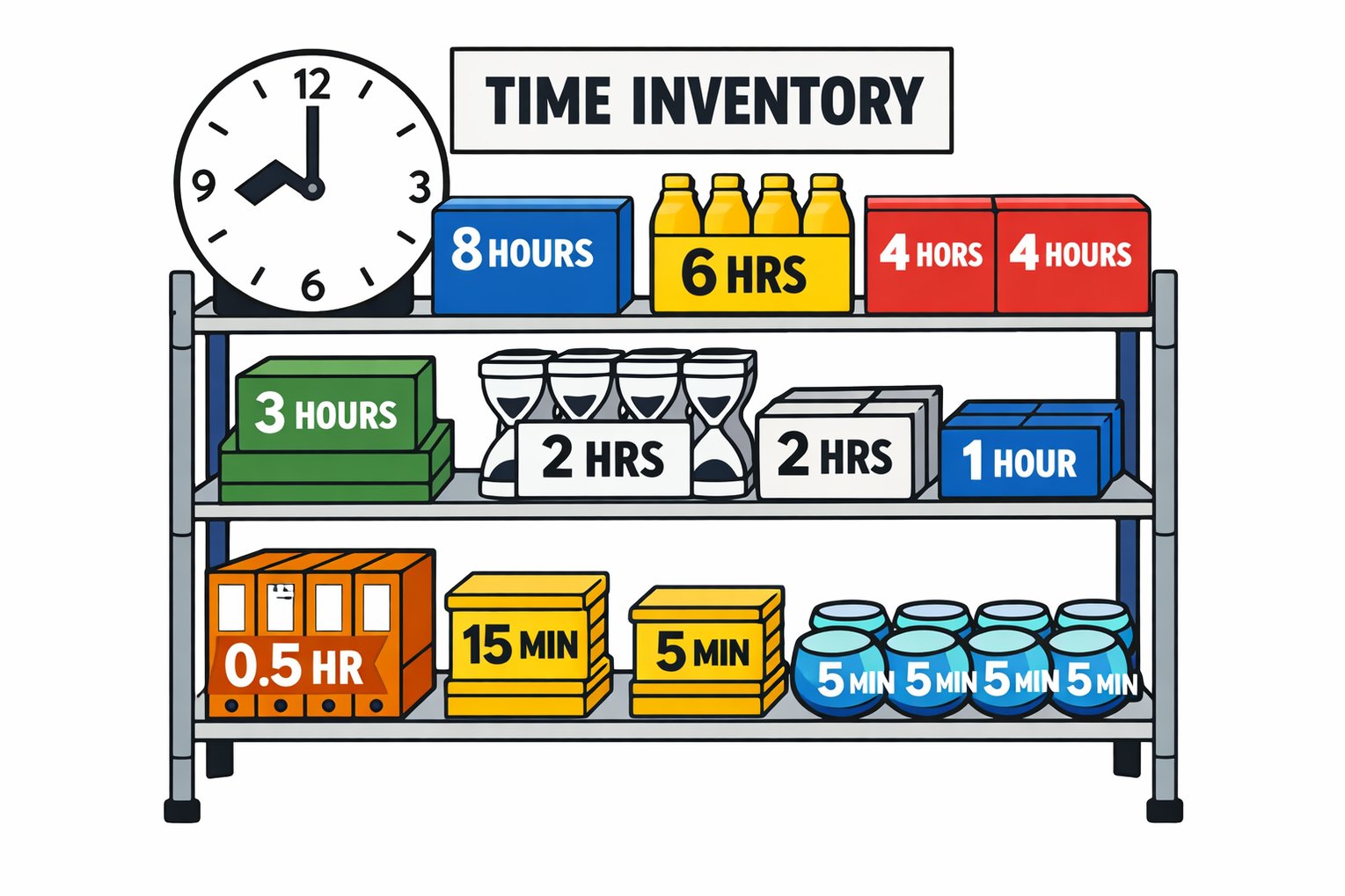
Time is your inventory.
Think about it like this: if you ran a grocery store, you'd know exactly how much inventory you have, what it costs, and what you're selling it for. You'd know which products are profitable and which are taking up shelf space without making you money.
Your agency works the same way. Your team's time is your inventory. When you don't track it, you're running a supermarket without knowing what's on your shelves or how much anything costs.
Time tracking gives you the data to answer critical questions:
- Are we profitable on this client?
- Which services make us the most money?
- Do we have capacity to take on new work?
- Are we pricing our services correctly?
- Where is our team's time actually going?
Without tracking time, you can't answer these questions with any confidence. You're guessing. And in a service business, guessing is expensive.
Before you get started
Take the Agency Project Management Benchmark Assessment so you know what areas to prioritize.
The Real Benefits of Time Tracking for Agencies
Time tracking isn't fun. It's not the exciting part of running an agency. But neither is doing your taxes, and you do that because the alternative is worse.
Here are the real benefits that make time tracking worth the effort:
1. Accurate Profitability Analysis
You can't know if a client or project is profitable unless you know how much time went into it. Period.
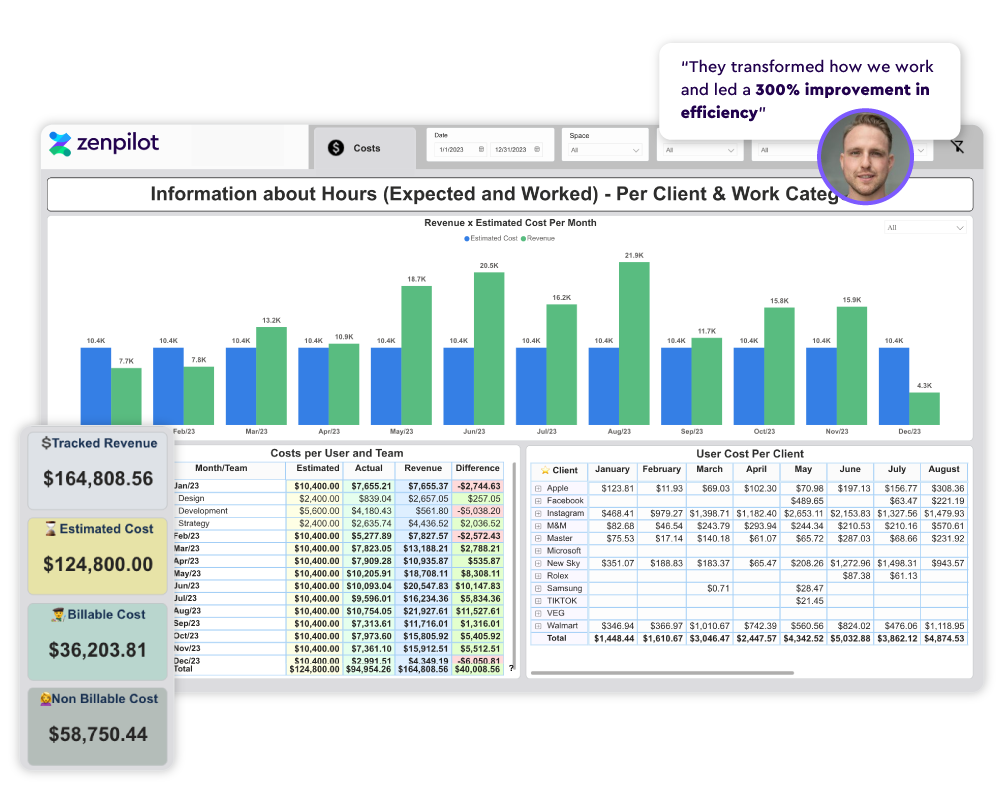
We've worked with agencies who thought they were making great money on certain clients, only to discover after implementing time tracking that they were losing money every single month. The retainer looked good on paper, but the actual hours going into the account told a different story.
Time tracking lets you calculate true profitability: revenue minus actual costs (including the cost of your team's time). This is the data you need to make smart decisions about pricing, which clients to keep, and which services to focus on.
2. Better Resource Planning
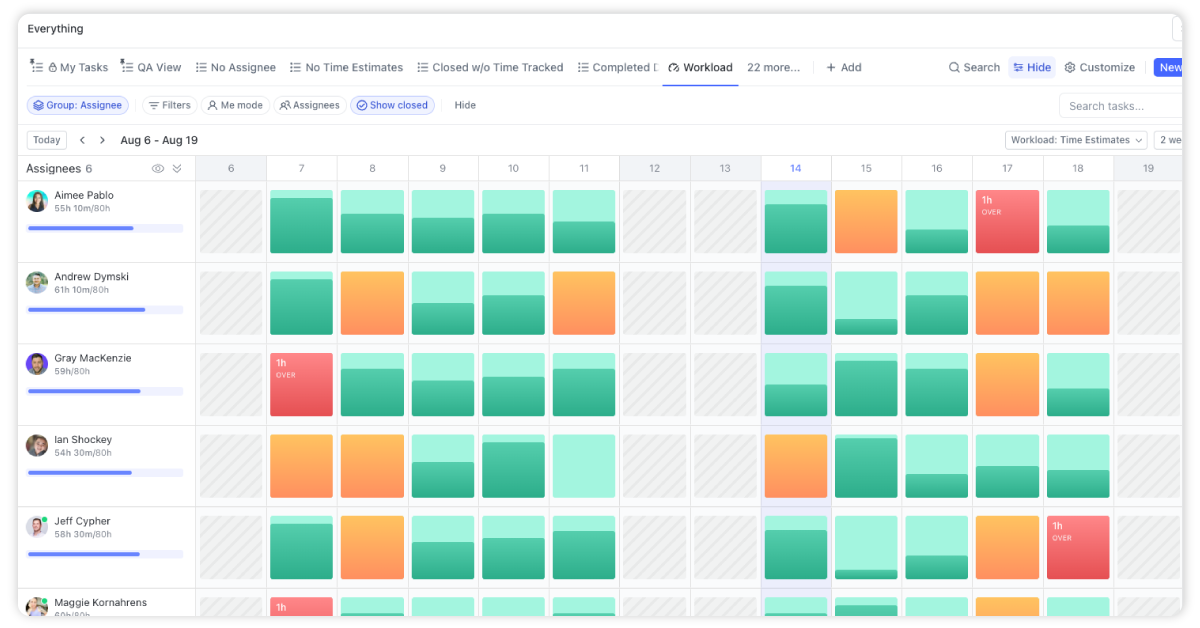
When you track time, you can see who has bandwidth and who's overloaded. This makes it easier to distribute work fairly, prevent burnout, and confidently say yes to new opportunities when you have the capacity.
Without time tracking, resource planning is guesswork. You're asking people "How busy are you?" and hoping for an honest answer. With time tracking, you have actual data.
3. Smarter Pricing Decisions
Every agency struggles with pricing at some point. Should you charge more? Less? Switch from hourly to value-based pricing?
Time tracking doesn't answer these questions directly, but it gives you the foundation you need. When you know exactly how long work takes, you can price with confidence. You can build accurate project estimates.
You can identify which services have the best margins and which ones are eating up too much time.
4. Improved Team Utilization
Utilization rate (the percentage of your team's available time that's spent on billable work) is one of the most important metrics for agency profitability. More on this later.
Time tracking is the only way to calculate it. And once you can measure it, you can improve it.
5. Better Client Communication
When clients question your invoices or ask "what did we actually get for our retainer this month?", time tracking gives you a clear answer. You can show exactly where the hours went and what was accomplished.
This transparency builds trust and makes it easier to have conversations about scope, budget, and value.
What You Should Actually Be Tracking
Not all time tracking is created equal. Here's what you need to track to get useful data:
Track By Client
Every hour should be associated with a client. This is non-negotiable if you want to understand client profitability.
Even internal work should be tracked. Just create an "internal" client in your system for things like business development, training, and operations work.
Track By Project or Retainer
Within each client, track time by project or retainer period. This gives you visibility into which types of projects are profitable and helps you spot scope creep early.
Track Billable vs. Non-Billable Time
Billable time is work you can invoice to clients. The direct delivery work, client meetings, revisions, etc.
Non-billable time includes everything else:
- Internal meetings
- Business development
- Training and learning
- Administrative tasks
- Time off (vacation, sick days)
Both matter. Billable time affects your revenue and utilization. Non-billable time affects your costs and team capacity.
Track By Task or Deliverable
Tracking at the task level gives you the most granular data. Instead of just knowing "we spent 40 hours on this client this month," you know "we spent 6 hours on strategy, 12 hours on content creation, 8 hours on revisions..."
This level of detail helps you identify inefficiencies and build better estimates for future projects.
Track Time Estimates vs. Actuals
When you create tasks in ClickUp, add time estimates. This lets you compare estimated time to actual time tracked, which is gold for improving your scoping and estimation skills.
How to Set Up Time Tracking in ClickUp
ClickUp has robust time tracking built in. Here's exactly how to set it up for your agency:
Enable Time Tracking in Your Workspace
First, make sure time tracking is enabled:
- Go to your Workspace settings
- Click on "ClickApps"
- Toggle on "Time Tracking"
That's it. Time tracking is now available across your entire workspace.
Set Up Your Hierarchy for Client Work
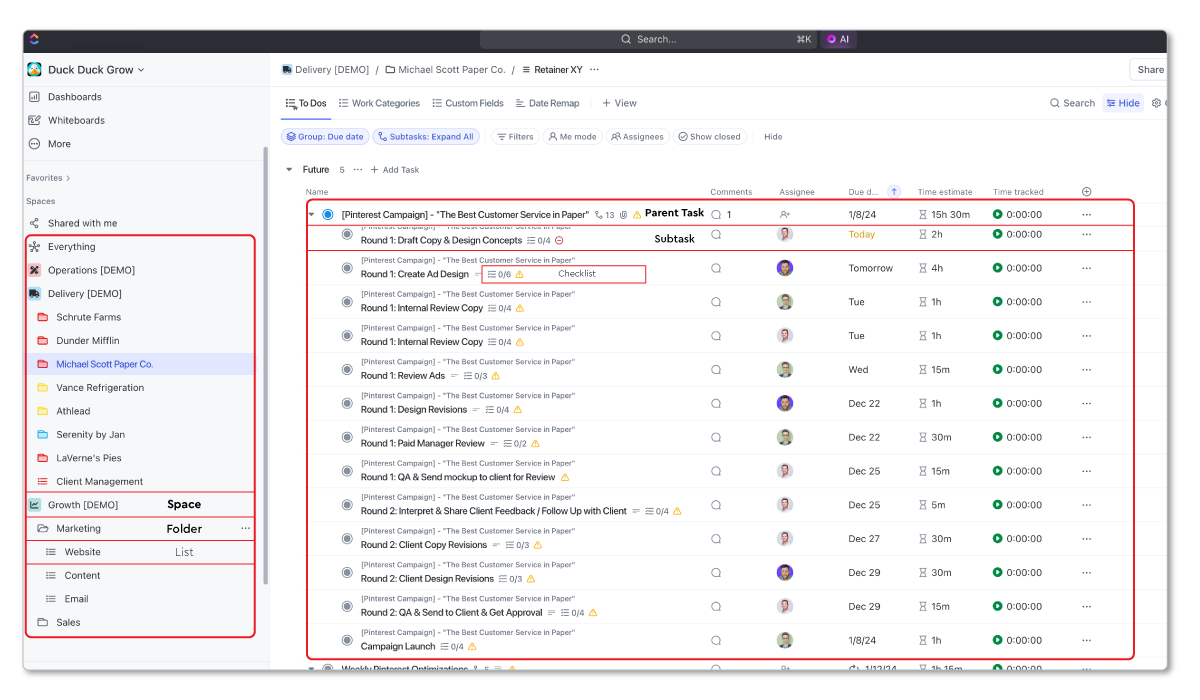
Before you start tracking time, you need a structure that makes sense for reporting. Here's what we recommend for agencies:
- Space: Delivery (or Client Work)
- Folders: Individual clients
- Lists: Current projects or retainers
- Tasks: Specific deliverables or work items
This hierarchy makes it easy to see time tracked by client (at the folder level) or by project (at the list level).
When your team tracks time on these tasks, you can roll up the data to see total time spent on the Q1 retainer, total time spent on Dunder Mifflin overall, or total time across all clients.
Add Time Estimate Custom Fields
Create a custom field called "Time Estimate" at your list or space level. Use this to estimate how long each task should take.
Format it as a number field (in hours). For example, "2.5" for two and a half hours.
Having estimates lets you compare planned vs. actual time, which is critical for improving your scoping accuracy.
Create Time Tracking Views
Build views that help different roles see the time data they need:
For Individual Contributors: Create a "My Time This Week" view showing tasks where they've tracked time in the current week.
For Project Managers: Create a "Time by Project" view showing total tracked time vs. estimates for each active project.
For Leadership: Create a dashboard with widgets showing:
- Total billable hours tracked this month
- Time tracked by client
- Time tracked by team member
- Billable vs. non-billable breakdown
Decide on Tracking Method
ClickUp offers two ways to track time:
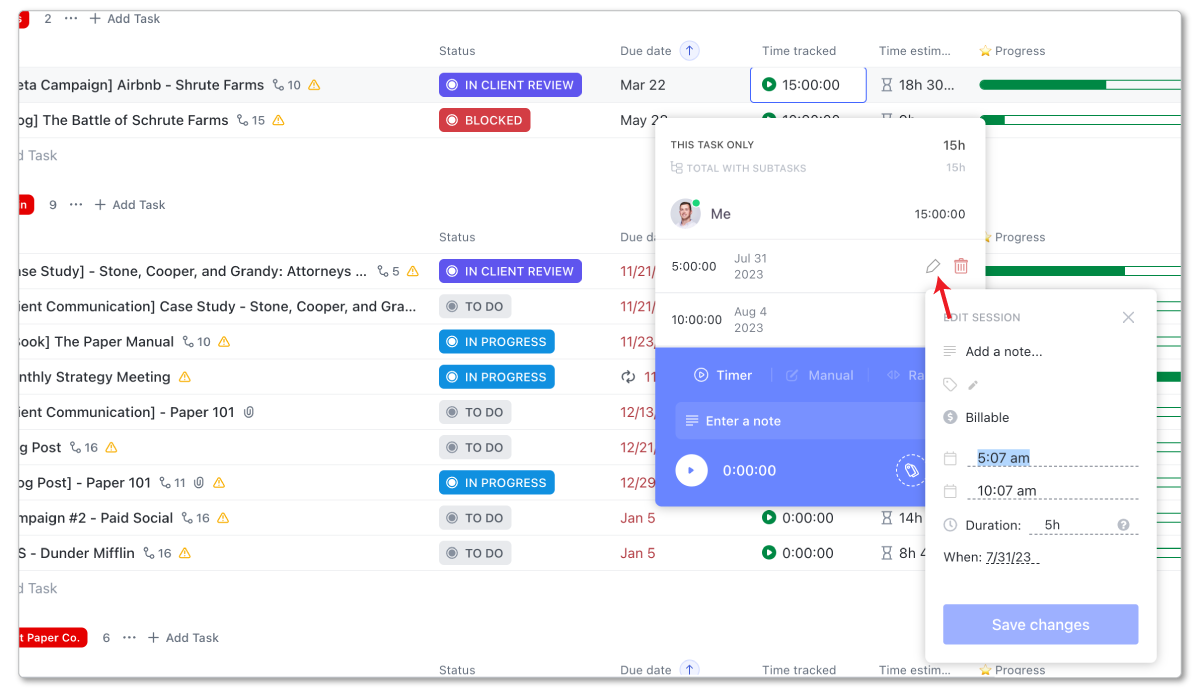
- Manual Time Entry: Team members add time entries after completing work, specifying start time, end time (or duration), and adding a description.
- Time Tracker: Team members start a timer when beginning a task, and stop it when done. ClickUp can track time in the browser or via desktop/mobile apps.
For agencies, we typically recommend the timer approach. It's more accurate and requires less effort than manual entry. That said, some team members prefer manual entry, and that's fine as long as they're doing it consistently.
Make Time Tracking Part of Your Process
Here's where most agencies fail: they set up time tracking but don't build it into their workflows.
Add time tracking to your standard operating procedures:
- Start the timer when you start a task
- Stop it when you're done or switch to something else
- Add a quick note describing what you did (optional but helpful)
- Track time daily, not weekly or monthly after the fact
Make this part of your "definition of done" for tasks. A task isn't complete until time is tracked.
Understanding Utilization Rate (And Why It Matters)
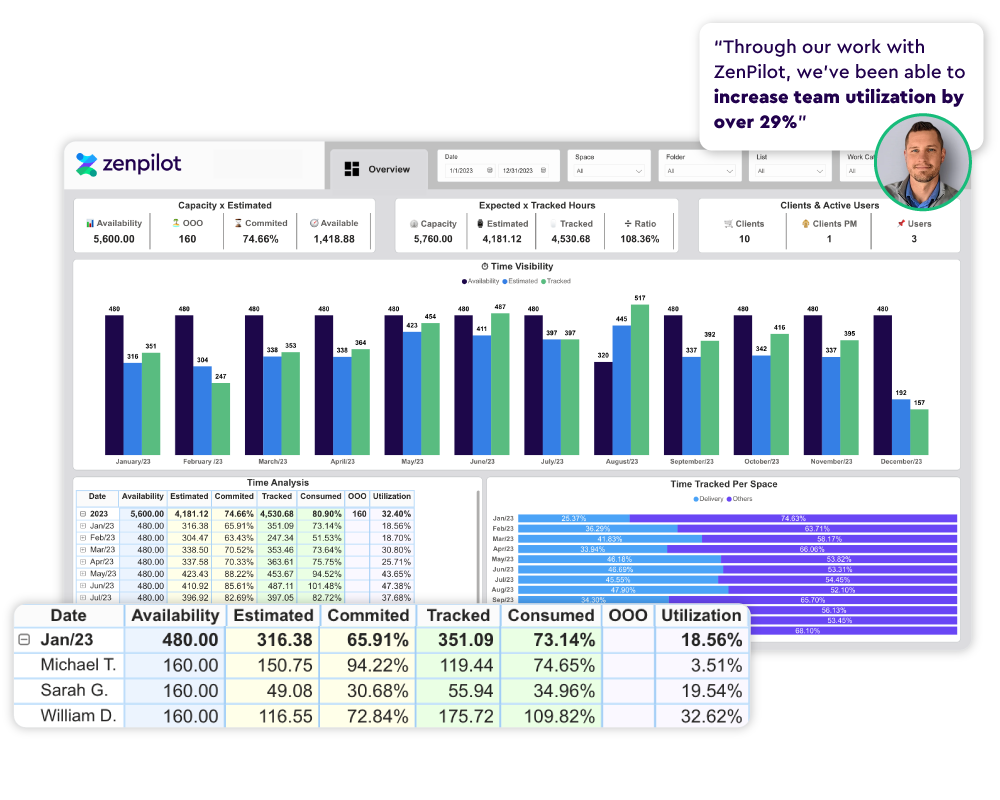
If you're only going to track one metric from your time data, make it utilization rate.
Utilization rate is the percentage of your team's available time that goes toward billable client work.
Here's the formula:
Utilization Rate = (Billable Hours / Total Available Hours) × 100
For example, if someone has 40 available hours in a week and tracks 28 billable hours, their utilization rate is 70% (28 ÷ 40 × 100).
Why Utilization Matters
Utilization directly impacts profitability. If your team is only 50% utilized, that means half your labor costs are going toward non-billable work. That's expensive.
For most agencies, target utilization rates are:
- 60-70% for senior leadership and strategists
- 70-80% for project managers and account managers
- 75-85% for individual contributors and delivery team members
Nobody should be at 100% utilization. You need buffer time for internal work, training, meetings, and simply thinking.
But if your team is consistently below 60% utilization, you're leaving money on the table.
How to Calculate Team Utilization in ClickUp
Here's the process:
- Determine total available hours per person per week. For a full-time employee working 40-hour weeks, this is typically 40 hours minus time off.
- Tag all billable work appropriately. Use a custom field, label, or folder structure to identify billable vs. non-billable time.
- Pull time tracking data. Use ClickUp's time reporting features or export data to analyze in a spreadsheet.
- Calculate utilization by summing each person’s billable hours for the given time period, dividing that total by their available hours, and multiplying the result by 100.
- Look for patterns. Who's over-utilized (risk of burnout)? Who's under-utilized (opportunity to take on more work)? Which clients or project types are eating up the most time?
Understanding utilization helps you make better staffing decisions, identify training opportunities, and price your services more accurately. It's one of the most important KPIs your agency should be tracking.
Getting Your Team to Actually Track Time
Here's the hard truth: setting up time tracking is the easy part. Getting your team to do it consistently is where most agencies struggle.
Here's what actually works:
1. Explain the "Why"
Your team needs to understand that time tracking isn't about micromanaging them. It's about understanding the business.
Be transparent about what you're trying to achieve:
- Better profitability so you can afford raises and bonuses
- Accurate capacity planning so they're not constantly overworked
- Fair work distribution so nobody's drowning while others have slack
- Better pricing so you're not undercutting yourselves
When people understand the why, they're much more likely to buy in.
2. Make It As Easy As Possible
The harder time tracking is, the less consistently it will happen.
Use ClickUp's timer feature so people can start and stop with one click. Integrate with browser extensions or desktop apps so the timer is always accessible.
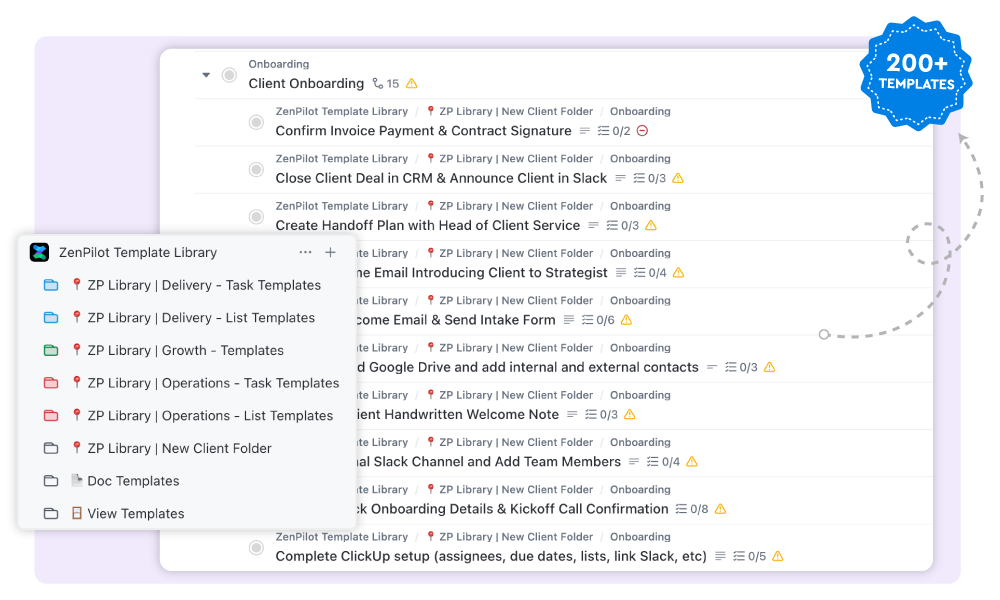
Build time tracking into your task templates. When someone creates a blog post task from a template, the time estimate is already there. They just need to start the timer.
3. Build It Into Your Workflow
Don't treat time tracking as a separate thing people have to remember. Embed it into your standard processes.
For example:
- Daily standup includes "Did everyone track time yesterday?"
- Weekly team meetings include a quick review of time tracking compliance
- Task status changes require time to be tracked (e.g., you can't move a task to "Complete" without tracked time)
4. Lead By Example
If leadership doesn't track time, why should anyone else?
Make sure managers, directors, and owners are tracking their time consistently. This sets the standard and shows it's important.
5. Track Daily, Not Weekly
Time tracking accuracy drops dramatically when people try to remember what they worked on three days ago.
Make daily tracking the expectation. Encourage people to track as they work, or at minimum, track at the end of each day.
6. Don't Use It to Punish People
The fastest way to kill time tracking adoption is to use it as a weapon.
Don't call people out publicly for low billable hours. Don't use time tracking to police bathroom breaks. Don't make it feel like Big Brother.
Use time data to identify systemic issues (too many meetings, unclear priorities, scope creep) and address those problems, not to blame individuals.
7. Close the Loop
Show your team what you're doing with the time data. When you use time tracking insights to make a pricing decision, redistribute work more fairly, or identify a training need, tell your team.
When they see that their effort to track time is actually leading to improvements, they're much more likely to keep doing it.
Time Tracking Best Practices for Agencies
Here are the proven practices that separate agencies who get value from time tracking from those who don't:
Start With Estimates
Always estimate how long you think a task will take before starting it. This creates a baseline for comparison and helps you get better at scoping over time.
In ClickUp, add a "Time Estimate" custom field to your tasks and require it to be filled in during planning.
Track Everything
Don't just track billable client work. Track internal meetings, business development, training, administrative time. All of it.
This gives you a complete picture of where your team's time goes and helps you identify hidden time sinks.
Add Context to Time Entries
ClickUp lets you add descriptions to time entries. Use this to add quick context about what you did.
Instead of just "3 hours tracked," you get "3 hours tracked - Created blog outline, wrote first draft, sourced images."
This makes time data much more useful when you're analyzing it later or explaining it to clients.
Review Time Data Weekly
Don't let time data pile up for months before looking at it. Review it weekly.
Look for:
- Tasks that went way over estimate (why?)
- Team members who are over or under-utilized
- Projects that are tracking toward going over budget
- Patterns in how time is being spent
Weekly reviews let you catch problems early and adjust course.
Use Time Data to Improve Estimates
One of the best uses of time tracking data is improving your estimation accuracy.
After completing projects, compare estimated vs. actual time. Look for patterns:
- Do blog posts always take longer than estimated?
- Are client revisions eating up more time than planned?
- Do certain team members consistently estimate high or low?
Use these insights to build better estimates for future work.
Create Standard Hourly Rates
Assign hourly rates to different roles (strategist, designer, developer, account manager). This lets you calculate the dollar value of time tracked, even if you're not billing hourly.
When you know a project consumed $12,000 worth of team time but you only billed $8,000, you have a clear profitability problem to address.
Build Time Tracking Into Templates
Create project templates in ClickUp that include pre-populated tasks with time estimates. This standardizes your estimation approach and makes it easier to launch new projects quickly.
Don't Obsess Over Perfection
Is someone's time entry 15 minutes off because they forgot to stop the timer? Don't lose sleep over it.
Time tracking doesn't need to be perfect to be useful. Even 80% accuracy gives you dramatically better data than you had before.
Focus on consistency over precision. It's better to have everyone tracking time within 10-15 minutes of accuracy than to have perfect data from half your team and nothing from the other half.
Common Time Tracking Mistakes to Avoid
Learn from the mistakes we've seen hundreds of agencies make:
Tracking Time Without Using the Data
Time tracking is pointless if you're not reviewing and acting on the data. Don't track time just to check a box.
Build regular reviews into your schedule. Use the data to make decisions about pricing, staffing, processes, and client relationships.
Making Time Tracking Too Complicated
Don't create 47 different categories for how time should be tracked. Don't require extensive notes on every time entry. Don't demand time entries down to the minute.
Complexity kills adoption. Keep it simple.
Only Tracking Billable Time
If you only track billable work, you're missing half the picture. You need to know where all your team's time goes to truly understand capacity and utilization.
Track internal work, meetings, business development, training. Everything.
Using Time Tracking to Micromanage
Time tracking should reveal systemic issues (too many meetings, scope creep, inefficient processes), not individual performance problems.
If someone's consistently low on billable hours, don't assume they're slacking. Maybe they're in too many meetings. Maybe they're taking on too much internal work. Maybe they need training on efficiency.
Dig into the why before jumping to conclusions.
Not Connecting Time Tracking to Your PM System
Time tracking works best when it's integrated into your project management system, not bolted on afterward.
Track time directly on tasks in ClickUp. This connects time data to projects, clients, and deliverables automatically. Don't use a separate time tracking tool that requires manual reconciliation.
Giving Up After Two Weeks
Time tracking adoption takes time. Don't expect perfect compliance immediately.
It typically takes 4-6 weeks for time tracking to become a habit. Stick with it. Keep reminding people. Keep showing them why it matters.
Most agencies who say "time tracking didn't work for us" actually mean "we gave up before it became a habit."
Tracking Time After the Fact
Memory is terrible. When people try to recreate their week on Friday afternoon, the data is garbage.
Encourage real-time tracking (start and stop the timer as you work) or same-day tracking (track at the end of each day). Weekly time entry doesn't work.
Turning Time Data Into Better Decisions
Here's where time tracking pays off: using the data to make smarter business decisions.
Pricing Your Services
Time data shows you exactly how long work takes, which lets you price with confidence.
If you know a blog post typically takes 8 hours between strategy, writing, revisions, and publishing, you can price accordingly. You're not guessing anymore.
You can also identify which services have the best margins. Maybe SEO strategy is highly profitable (good margin between time invested and price charged) while social media management is break-even or unprofitable.
Use this data to guide which services you emphasize and how you package offerings.
Identifying Scope Creep Early
When you're tracking time against estimates, you'll see projects that are tracking over budget before they spiral out of control.
This gives you the chance to have proactive conversations with clients about scope, budget, or timeline adjustments.
Improving Your Operations
Time data reveals inefficiencies in your processes.
Are revisions taking way longer than they should? Maybe your approval process isn't clear. Is strategy work consistently going over estimate? Maybe you need to refine your discovery process or set better client expectations.
Look for patterns in where time is being spent and where estimates are off, then investigate the underlying process issues.
Making Staffing Decisions
Time data tells you when you have capacity to take on new clients and when you need to hire.
If your team is consistently at 85%+ utilization, you're at capacity. Taking on more work means either turning away opportunities or burning out your team. Time to hire.
If utilization is consistently at 50%, you have room to grow revenue without adding headcount.
Time data also helps you decide who to hire. If you're consistently overloaded on design work but have capacity in strategy, you know you need a designer more than a strategist.
Having Better Client Conversations
Time tracking gives you the data to back up difficult conversations with clients.
When a client wants to add "just one more thing" to this month's deliverables, you can show them exactly how much time you've already allocated and why adding more work means something else has to come off the plate or the budget needs to increase.
When clients question your value, you can show exactly where their retainer hours went and what was accomplished.
Understanding True Profitability
The biggest benefit of time tracking is understanding which clients, projects, and services are actually profitable.
Revenue alone doesn't tell you profitability. A $10K/month retainer might look great, but if it's consuming $15K worth of team time, you're losing money every month.
Time data lets you calculate true profitability: revenue minus costs (including the cost of time). This is the foundation for building a more profitable agency.
Conclusion
Remember: time tracking is a tool, not a solution. The value comes from what you do with the data, not from collecting it.
Don't overcomplicate it. Start simple, build the habit, and expand from there.
And if you want help implementing ClickUp time tracking the right way (including setting up your hierarchy, building the right views, and training your team), book a call with my team. We've helped thousands of agencies build project management systems that actually work, and we can help you too.