ClickUp Brain 2 Review: What Changed, What It Costs, Is It Worth It

ClickUp shipped Brain² in June 2026, and the question started coming up on client calls almost immediately: is this a real rebuild, or did Brain get a rebrand and a superscript?
(Housekeeping note: ClickUp writes it Brain², I’ll mostly type Brain 2, and they’re the same product.)
I didn’t want to review this one from the changelog. So I got Holly Peck, Staff AI Solutions Development Manager at ClickUp, on ClickUp Weekly to demo it live. Holly’s been at ClickUp since 2020, so she’s watched every version of Brain ship (including a couple that, in my view, didn’t live up to the launch video).
Watch the full conversation on ClickUp Weekly Episode 20, or keep reading for the written version.
One disclosure before we start, because I owe you it: ZenPilot is ClickUp’s first and highest-rated Solutions Partner. We’ve implemented ClickUp for 3,100+ clients since 2013, and I’m a lifelong early adopter who is predisposed to like shiny AI features. I’ve also cleaned up after enough failed AI rollouts to be picky, so I’ll do my best to keep both halves of my brain involved :)
Is ClickUp Brain 2 Worth It? The Short Version
Is ClickUp Brain 2 worth it? Yes, if you’re already on ClickUp. The persistent memory and automatic model routing alone justify the upgrade, starting at $9 per user per month on annual billing.
The original Brain was a decent assistant with amnesia. Ask it to draft a client update in your voice on Monday, and by Tuesday you were re-explaining your voice from scratch. Model selection was a dropdown most people never touched, so requests ran on a default that may or may not have fit the job.
Brain² fixes both, and it pushes much further into agents that run in the background on their own.
What’s working:
- Memory - Brain remembers your formatting rules and corrections across sessions
- Model routing - each request goes to whichever model fits the job (Claude, GPT, or Gemini), automatically, and it can switch models mid-task
- Artifacts - one prompt turns workspace data into a finished deck, doc, or site instead of raw text you still have to format
- Agents - Holly demoed two of her own that run unattended (more on those below)
What I’m not sold on:
- Pricing - still an add-on billed on every paid seat, whether or not every seat uses it
- Workspace dependency - Brain² pulls answers from your workspace, so a messy workspace gets you confident wrong answers
- Maturity - it shipped a few weeks ago, and the playbook for building good agents is still being written, including inside ClickUp
ClickUp Brain 2 vs Brain 1.0: What Actually Changed
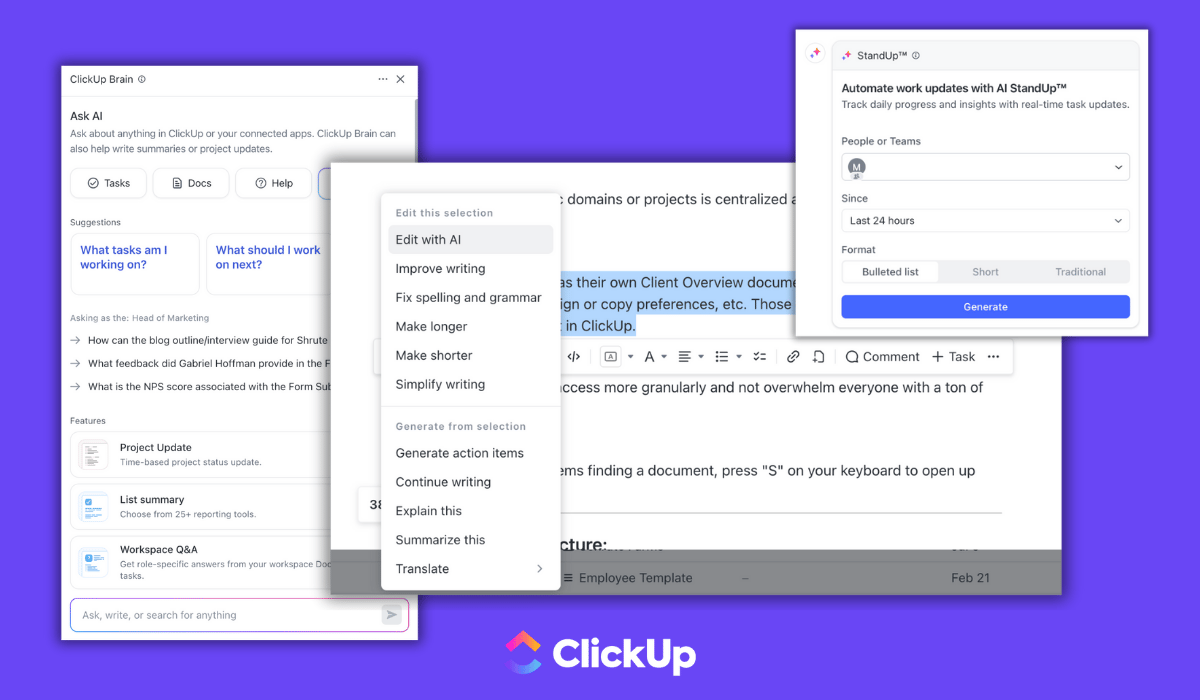
The old Brain was good for one-off requests. Summarize this doc, tell me what’s overdue on this client. Useful, but nothing you’d build a workflow on, because it started from zero every session.
Let me walk through the four changes that matter.
Memory - Tell Brain² once how your team writes a status update and it keeps writing them that way. Correct its tone once and the correction sticks. How many times have you re-explained your brand voice to an AI in the past month? That loop is gone.
Model routing - Brain² sends each request to Claude, GPT, or Gemini based on what the job needs, and it can change models partway through a task. You’ll never think about model selection again, which is the right call. Picking models is not a skill your account managers should need.
Context from outside ClickUp - Brain² pulls from your calendar, Gmail, and connected apps on top of your tasks and docs. Holly demoed live email triage across multiple inboxes on the episode, and that’s the demo I’d show a skeptic first. Gmail and Slack support covers read, write, and search, with external MCP connections for wiring in other tools.
Artifacts and Saved Prompts - Ask for a recap of last quarter’s client wins and Artifacts hands you an actual deck built from your workspace data, not three paragraphs you still need to design around. Saved Prompts lock your team’s voice and formatting into reusable prompts, so five people asking for the same kind of output stop getting five different tones back.
The Complete ClickUp AI Guide
Pricing, Super Agents, limitations, and how to actually get value from Brain, from ClickUp’s #1 Solutions Partner.
Read the Full Guide →Brain 2 Agents: The Two That Sold Me
Feature lists don’t convince me much anymore. What convinced me was Holly walking through two agents of her own.
The first one she calls Invisible Woman. It sweeps her workspace every 24 hours looking for work that’s happening but not getting credited. Think of the kind of contribution that never surfaces in a performance review: a problem quietly solved in a comment thread while nobody was watching. A good manager catches that occasionally, by accident. The agent checks every day. My first thought watching it was that I want this running on our delivery team’s workspace.
The second is Mrs. Weaver, her bug-triage agent, which sorts incoming bugs before a human gets involved.
Neither one waits for a prompt. They watch the workspace and act on what they find, and that’s clearly where ClickUp is betting the roadmap.
ClickUp Brain 2 Pricing: Still an Add-On
ClickUp Brain 2 costs $9 per user per month for Brain AI or $28 per user per month for Everything AI, billed annually. On monthly billing those jump to $18 and $68. It’s an add-on to every plan, including Enterprise, and it’s billed on every paid member in your workspace, not just the people using it.
| Tier | Annual | Monthly |
|---|---|---|
| Brain AI | $9/user/mo | $18/user/mo |
| Everything AI | $28/user/mo | $68/user/mo |
Prices verified on ClickUp’s pricing page, July 2026. There’s also a usage layer worth knowing about: AI Super Credits run $10 per 10,000 credits and cover Super Agents, AI fields, and image generation, so heavy agent use can add to the bill.
Let me flag two things in that structure.
Per-seat billing is my standing gripe, and Brain² didn’t change it. A 50-person team on Everything AI pays $16,800 a year (50 seats x $28 x 12 months), whether 50 people use it or 5. The teams with the most to gain from AI are the ones the math punishes hardest.
Also watch the annual-versus-monthly spread on Everything AI: $28 against $68 is a brutal premium for flexibility. If you’re buying the top tier, pay annually or don’t bother.
Everything AI adds premium models, unlimited Super Agents, and Brain MAX on top of the standard tier. We break down which tier fits which team in our complete ClickUp AI guide.
Is Reddit Right About ClickUp Brain?
Search Reddit for ClickUp Brain and you’ll find the same split we hear from clients directly.
One camp gets real value from the daily-assist work: standups, status checks, cross-app search, quick drafts. The other camp keeps hitting the same two walls: file uploads that don’t behave the way people expect, and custom dashboard and reporting work that still needs a human. In our experience that reporting gap exists because agency reporting gets very specific, very fast.
Both camps are right, and Brain² moves the first group forward more than the second. Memory and Artifacts make the daily assists noticeably better, but the dashboard complaints aren’t going away yet. The unfiltered take on r/clickup matches what our clients tell us on calls, which is about the strongest endorsement of Reddit’s accuracy I can offer.
Where Brain 2 Still Falls Short
Start with the big one. Brain² is a context engine, and it inherits whatever context you give it. Inconsistent statuses, missing due dates, naming conventions nobody agreed on, processes that live in someone’s head: feed it those and it still answers confidently. It just answers wrong more often. Building that clean foundation is the exact work we’ve done for 3,100+ clients, and it matters even more now that AI is reading the whole workspace.
The pricing math punishes scale, covered above. I don’t love paying for seats that never open the feature, and I’d bet ClickUp hears that from every team past 20 people.
And agent-building is young. Holly’s agents work, as far as I can tell, because they’re scoped tightly to jobs she knows how to verify. That judgment takes reps. Start with one narrow agent and watch its output for a couple of weeks before you build the next one.
My Verdict: Who Should (and Shouldn’t) Buy Brain 2
Already paying for Brain? Upgrade the moment Brain² reaches your workspace. Memory alone ends the cycle of re-explaining your preferences every single session.
Not on Brain yet? Start with the standard $9 tier and prove value on one narrow use case. Saved Prompts for whoever writes your client updates is a good first pick. Skip Everything AI until a specific need for premium models or unlimited agents shows up. You can always upgrade later.
Messy workspace? Fix that before you buy anything. This is the Tools, Process, Habits triangle we’ve taught for a decade: Brain² is a serious tools upgrade, but it amplifies whatever process and habits already live in your workspace. Clean structure in, useful answers out. Mess in, faster mess out.
Near the end of the episode, Holly and I got into the adoption curve on features like this. Teams move from resistance to acceptance to dependency. From where I sit, that cycle keeps getting shorter. My take on the show: AI in your work platform is optional today and won’t be by June 2028. The teams that will be fine either way are the ones getting their foundation right now, while it’s still a choice.
Make Brain² Worth the Money
Brain² can only work with the workspace you give it. We’ve built clean, AI-ready ClickUp workspaces for 3,100+ clients. Book a free 30-minute call and we’ll tell you what to fix before you spend a dollar on AI seats.
Book a Free Call →FAQ: Quick Answers to Common Questions
Is ClickUp Brain 2 included in my ClickUp plan?
No, and this surprises people constantly. Every plan, including Enterprise, treats Brain as a paid add-on: $9/user/month for Brain AI or $28/user/month for Everything AI on annual billing, $18 and $68 if you pay monthly.
What’s different about ClickUp Brain 2 versus the original Brain?
Memory is the headline: Brain 2 keeps your preferences and corrections across sessions instead of starting over every time. Beyond that, it picks the right AI model for each request on its own, produces finished outputs like decks and docs through Artifacts, and can read your calendar and email too.
Do I need Everything AI, or is the standard Brain tier enough?
Start standard. Run one repeatable workflow on it for a month, something like client status updates built on Saved Prompts, and let the results tell you whether premium models or unlimited Super Agents would earn the extra $19 per seat. Most teams we work with don’t need the top tier on day one.
Are Brain 2 agents actually useful, or still a gimmick?
Useful, with supervision. People at ClickUp use them for their own work; Holly Peck showed off her bug-triage agent, Mrs. Weaver, on our show. Scope your first agent to one narrow job and review its output weekly. Don’t hand a brand-new agent anything business-critical on day one.
What does Reddit think of ClickUp Brain?
It’s split. The praise centers on daily assists like standups and quick status pulls. The complaints pile up around uploads and custom dashboards. Spend ten minutes on r/clickup and you’ll see both camps, and honestly, both match what we hear from clients.
Want Help Getting More Out of ClickUp?
Brain² is the most interesting thing ClickUp has shipped in a while, but it’s one layer of the platform. Most teams I talk to aren’t getting full value from the layers they already pay for: structure, dashboards, automations, time tracking, and now AI on top of it all.
That’s the job at ZenPilot. We look at how your team runs ClickUp today, show you exactly what to fix, and help you roll out the fixes (Brain² included) in a way your team will adopt instead of ignore.
If you want that kind of look at your workspace, book a free 30-minute call. Worst case, you walk away with a shorter list of things to worry about.